














Web browsers evolve constantly to keep pace with the demands of modern web applications, user expectations, and emerging standards in web design. Google Chrome, one of the most widely used browsers globally, regularly introduces updates that enhance performance, security, and developer capabilities. The release of Google Chrome 145 is another step forward, delivering improvements that particularly benefit front-end developers and designers working with layout and typography.
Among the highlights of this release is the introduction of enhanced support for multi-column layouts, specifically through the implementation of new CSS properties that allow columns to wrap more intelligently. Alongside this core update, Chrome 145 also introduces typography refinements, animation handling improvements, security features, and backend optimizations that collectively contribute to a richer web development environment.
This article explores these updates in depth, focusing especially on the improved multi-column layout features, their technical significance, and their potential impact on modern web design practices.
Chrome 145 Release Overview
Google rolled out Chrome 145 to the stable channel in early 2026, introducing a set of CSS-focused improvements and broader browser updates. The release includes support for multi-column layout wrapping, enhancements to text rendering properties, security-focused credential features, and changes to browser internals like IndexedDB storage handling.
One of the headline updates is the addition of support for the column-wrap and column-height CSS properties from the Multi-Column Layout Module Level 2 specification. These features give developers greater flexibility when structuring content across multiple columns, particularly when dealing with overflow behavior. The update also reflects Google’s broader commitment to aligning Chrome with evolving web standards, ensuring developers can rely on consistent cross-platform implementation of modern CSS features.
Understanding Multi-Column Layouts in CSS
Before diving into Chrome 145’s enhancements, it’s important to understand what multi-column layouts are and why they matter. Multi-column layout is a CSS capability that allows content — typically text — to be distributed across multiple vertical columns within a container. This layout style mimics newspaper or magazine formatting and is commonly used in editorial design, documentation pages, dashboards, and reading interfaces.
Traditionally, developers used properties such as:
- column-count
- column-width
- column-gap
These properties enabled the creation of multi-column flows but came with limitations. When the height of a container was constrained and content exceeded available space, overflow columns were displayed horizontally. This often-produced unwanted horizontal scrollbars and degraded usability. Such behavior forced developers to either tolerate awkward navigation patterns or abandon multi-column layout in favor of alternatives like CSS Grid or Flexbox.
The Core Enhancement: Column Wrapping Support
Introducing column-wrap and column-height
Chrome 145 introduces support for two new CSS properties:
- column-wrap
- column-height
These properties enable columns to wrap into additional rows when vertical space is exceeded, instead of extending horizontally beyond the container. Developers can now specify a maximum column row height and determine how overflow should behave.
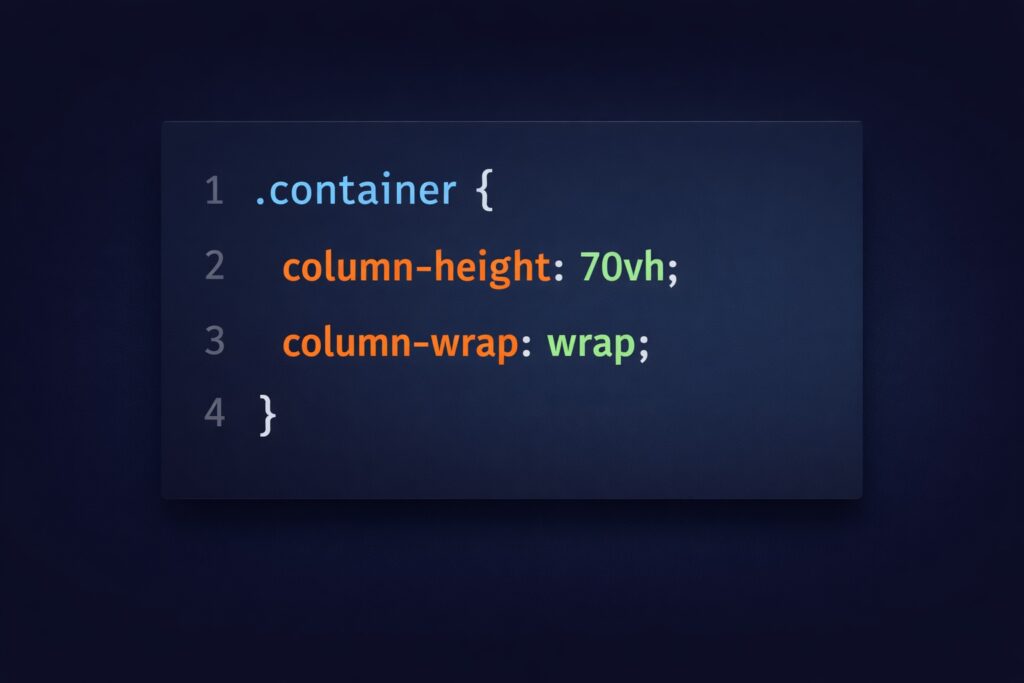
For Example:
With this configuration, when content exceeds the defined height, columns move to the next row rather than generating horizontal overflow columns. This change fundamentally alters how multi-column layouts can be used in responsive design.
Layout Limitations Before Chrome 145
Before the release of Chrome 145, restricting the height of a multi-column container often led to an undesirable layout behavior. When content exceeded the defined height, additional columns were rendered in the inline direction, most commonly extending horizontally beyond the viewport.
This frequently introduced horizontal scrollbars, which disrupted reading flow and reduced overall usability. Developers were typically forced to choose between allowing vertical scrolling within individual columns or accepting horizontal scrolling across overflowing columns. Neither approach delivered a comfortable or intuitive reading experience, particularly for content-heavy interfaces.
Improved Multi-Column Behavior in Chrome 145
Chrome 145 introduces a more refined approach to handling overflow in multi-column layouts. Instead of extending columns horizontally when space is exceeded, overflow content now shifts into new rows. This change helps keep layouts contained within the visible viewport, significantly reducing or eliminating the need for horizontal scrolling.
As a result, content flows more naturally and remains easier to navigate. This improvement is particularly beneficial for accessibility, smaller screen sizes, and environments where content length is dynamic or unpredictable. Wrapped columns also allow for layout structures that were previously impractical using the traditional multi-column model.
Practical Advantages for Developers
Enhanced Responsive Design
Responsive web design depends on adaptability. The ability to wrap columns vertically ensures content adjusts to various screen sizes and container constraints without layout breakage. Developers no longer need complex workarounds or layout replacements for scenarios involving unpredictable content lengths.
Improved User Experience
By eliminating horizontal scrolling, Chrome 145 significantly enhances readability and navigation flow across web pages. Users can now move through content in a natural vertical direction instead of navigating sideways, which often felt disruptive and unintuitive.
This improvement is particularly valuable for content-driven platforms such as news websites, documentation portals, and academic or technical reading interfaces, where clarity and focus are essential. By maintaining a consistent and predictable content flow, Chrome 145 helps developers deliver layouts that feel more polished, accessible, and user-friendly.
New UI and Interaction Patterns
The introduction of wrapped multi-column layouts also opens the door to new interface and interaction possibilities. Designers can now experiment with multi-row reading layouts, viewport-height column systems, and carousel-style vertical column transitions without relying heavily on scripts.
These emerging patterns encourage more creative approaches to layout design and expand the scope of what can be achieved using CSS alone. As a result, Chrome 145 supports greater innovation in modern UI design while keeping performance and maintainability intact.
Alignment with CSS Standards
By implementing features from the Level 2 specification, Chrome strengthens standardization across browsers and future-proofs web development practices. Developers who adopt these features early benefit from forward-compatible layout strategies.
Design Considerations and Challenges
While the new multi-column capabilities in Chrome 145 offer significant flexibility, they also introduce important design considerations. Users may not immediately realize that content continues in a new row, which can affect reading flow if not handled carefully. To address this, designers may need to incorporate visual indicators that subtly guide users through the layout.
Thoughtful spacing, separators, or decorative row elements can help improve clarity and ensure that the reading direction feels intuitive. Looking ahead, future enhancements—such as more refined styling controls for row gaps—are expected to further improve usability. Developers are encouraged to adopt these features with a balanced approach, combining creative layout experimentation with a strong focus on user experience.
Additional Developer Features in Chrome 145
Beyond multi-column wrapping, Chrome 145 introduces several other updates aimed at improving the overall developer experience. These enhancements span performance, rendering accuracy, and platform stability, helping developers build more reliable and visually consistent web applications. Together, these additions reinforce Chrome 145 as a well-rounded release that supports both innovative design and practical development needs.
Typography Enhancements
Chrome 145 introduces expanded typography control:
- Support for the text-justify property to refine justification behavior
- Percentage-based values for letter-spacing and word-spacing
These changes allow responsive text spacing adjustments relative to font metrics, providing more adaptable typographic control. This is especially valuable in multilingual and mobile-first design contexts.
Animation and Rendering Updates
Chrome 145 brings meaningful improvements to animation handling and visual rendering that give developers greater control over interactive experiences. With the introduction of the on animation cancel event handler, the animation lifecycle is now fully exposed, allowing developers to respond more precisely when animations are interrupted or stopped before completion. This completes the set of animation-related event handlers and helps create more reliable animation logic, especially in dynamic interfaces where state changes occur frequently.
In addition to animation control, Chrome 145 refines how shadows are rendered on elements with large border-radius values. These improvements enhance visual accuracy, ensuring that rounded shapes, buttons, and cards display shadows more naturally and consistently across different screen sizes and resolutions. Together, these updates contribute to smoother user interface effects, more predictable styling results, and a more polished visual experience in modern web applications.
Security and Session Improvements
Chrome 145 introduces Device Bound Session Credentials (DBSC), a security enhancement designed to bind user sessions directly to a specific device. By doing so, the browser significantly reduces the risk of session hijacking, even if session data is exposed or intercepted. This mechanism strengthens authentication by ensuring that valid sessions cannot be reused on unauthorized devices. In addition, Chrome periodically renews these sessions using cryptographic proof, which reinforces trust between the client and server throughout the session lifecycle. Together, these improvements provide a more secure foundation for modern web applications, particularly those handling sensitive user data or authentication workflows.
Storage and Backend Optimizations
Chrome 145 introduces several important storage and backend improvements that strengthen performance, privacy, and data reliability across web applications. The browser now supports a SQLite-based backend for Indexed DB, enabling more efficient data storage and improved consistency for applications that rely heavily on client-side databases. Alongside this, Chrome continues to reduce the exposure of user-agent strings, enhancing user privacy and encouraging more modern feature-detection practices. Additional policy and security updates further reinforce safe data handling. While these changes may not be immediately visible to end users, they provide meaningful benefits for developers building data-intensive and performance-sensitive web applications.
Image Format Support
A notable media-related update is the return of JPEG-XL decoding support, implemented using a Rust-based decoder for improved memory safety. Although currently behind a flag, this feature signals renewed interest in efficient high-quality image compression technologies.
Broader Impact on Web Development
Chrome’s dominance in the browser ecosystem means that updates often shape industry standards and development trends. The multi-column wrapping enhancement:
- Encourages wider adoption of multi-column layout
- Reduces reliance on workaround solutions
- Expands layout experimentation possibilities
Combined with typography, animation, and security improvements, Chrome 145 represents a holistic upgrade to the web platform.
For students and developers alike, understanding these features ensures alignment with evolving standards and prepares them for building modern web interfaces.
Conclusion
Google Chrome 145 is more than a routine browser update — it reflects continued advancement in web layout flexibility and developer empowerment. By supporting the column-wrap and column-height properties, Chrome addresses longstanding limitations in multi-column design and opens new possibilities for responsive, user-friendly layouts.
Alongside typography refinements, rendering improvements, security enhancements, and media support updates, the release demonstrates Chrome’s commitment to innovation across the entire web stack.
For developers, designers, and learners exploring modern CSS capabilities, Chrome 145 offers valuable tools that enhance both creative freedom and technical precision. Embracing these features not only improves current projects but also positions developers to take full advantage of future browser capabilities.




What do you think?
It is nice to know your opinion. Leave a comment.